Inspect the session
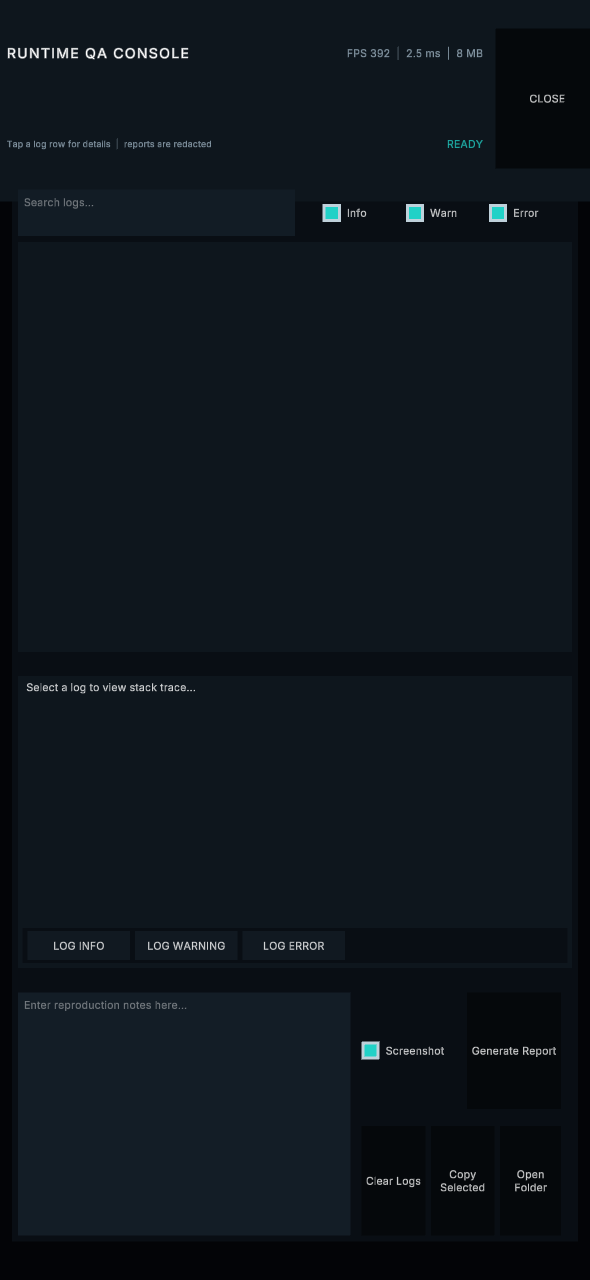
Search and severity filters, stack traces, a bounded log buffer, and a performance snapshot.
Testing & bug reports
Runtime QA Console & Bug Reporter
Give testers an in-game log console and exportable reports with useful session context.
Current price, license, version, and checkout details are shown on the marketplace.
Where it fits
Collect useful context from a tester’s game session. Inspect logs and stack traces, add notes, and export a ZIP with human-readable and machine-readable report data.
Include a performance snapshot and an optional screenshot. Configure text-redaction rules for known credentials and project-specific secrets before exporting or sharing reports.
Search and severity filters, stack traces, a bounded log buffer, and a performance snapshot.
Tester notes, JSON and text report files, a manifest, and an optional screenshot in a ZIP archive.
A configurable hotkey, tester preferences, safe-area-aware layouts, and explicitly registered debug actions.
Check your project
Text-redaction rules do not redact screenshot pixels. Review reports before sharing. Screenshot encoding uses the main thread; WebGL has a separate synchronous export flow.
Start with a small example
Use the package documentation alongside these steps. Confirm the version you have installed before following a platform-specific workflow.
Read the quick-start guideBefore you buy
The default destination is Application.persistentDataPath. You can configure an export directory. Browser downloads and Android sharing use their own platform flow.
No. The redaction pipeline processes text, not screenshot pixels. Leave out or review screenshots when they contain information you should not share.
No. Screenshot capture and PNG encoding use Unity on the main thread. Archive/file work uses background processing where supported; WebGL follows a synchronous browser-specific path.
Runtime QA Console
Review the package details and license on the Unity Asset Store, or ask a setup question first.